











مدد یافتہ پلیٹ فارمز
تفصیلات
Tags:- library
- platform
Codrut Fluent Design System
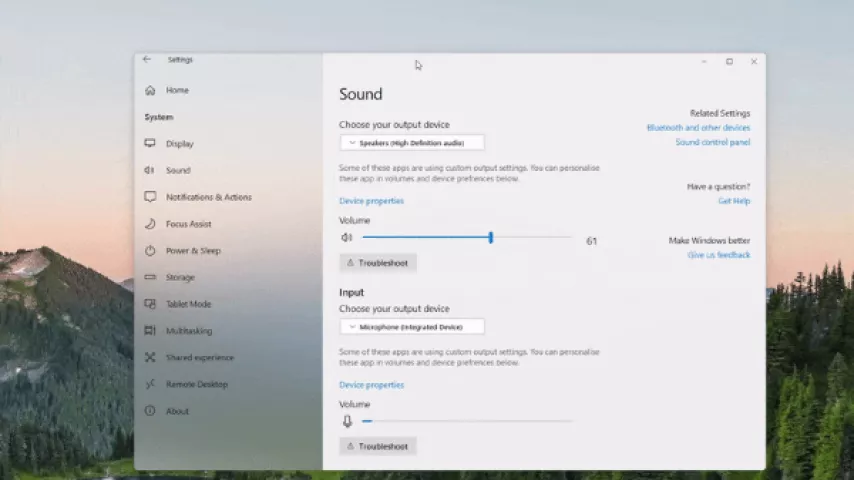
Codrut Fluent Design System (CFX) is a Delphi VCL component suite designed to bring the look, feel, and interaction patterns of Windows 11 and Microsoft's Fluent Design System to traditional Win32 applications.
CFX is built around the idea of combining the flexibility and native capabilities of Win32/VCL applications with a modern, Fluent-inspired user interface.
CFX is not to be confused with CodrutsVisualLibrary. CodrutsVisualLibrary is a broader collection of independent visual components, while Codrut Fluent Design System is specifically focused on providing a cohesive Fluent-style application framework.
Features
CFX provides a collection of customizable VCL components with support for modern visual effects, animations, system themes, icons, layouts, and more.
Theme Manager
The Theme Manager is the central system responsible for the visual appearance of CFX applications.
It provides:
- Windows Light/Dark theme integration
- System accent color support
- Centralized theme colors
- Automatic response to system theme changes
- Customizable application color palettes
- Shared visual configuration for CFX components
Components can use the global theme automatically while still allowing individual customization where needed.
Customization
Many CFX components provide extensive customization options, including:
- Custom colors
- Border radius and shapes
- Icons
- Alignment
- Animations
- Visual states
- Gradients
- Accent colors
- Component-specific appearance settings
This allows applications to either follow the standard CFX appearance or create their own visual style.
Icons
CFX includes the FXIcon system for drawing and storing icons.
Supported icon sources include:
- No icon
TBitmapTPictureTImageList- Segoe UI Icons
- Segoe Fluent Icons
- Segoe MDL2 Assets
The icon system is designed so that components can share the same icon representation and rendering functionality.
Components
CFX currently includes the following components and systems.
Panels & Containers
- Minimise Panel — A panel capable of minimizing itself with an optional animation. It works particularly well with
DoubleBufferedand can be used with multiple panels usingAlign = alTop. - Panel — An enhanced
TPanelwith additional features and system theme integration. - Layout — A component container designed for storing and organizing other controls.
- Scrollable Layout — A layout-based container with horizontal and vertical scrolling support.
- Scrollbox — A modern scrollbox using the CFX scrollbar system.
Buttons & Selection Controls
- Button — A Fluent-style button with extensive customization, including custom colors, shapes, button types, long presses, two-state behavior, checkable buttons, dropdown support, alignment, and icon positioning.
- ButtonDesign — An advanced and highly customizable button originating from CodrutsVisualLibrary. Supports multiple styles, icons, gradients, accent colors, alignment, subtext, automatic font sizing, and more.
- Radio Button — A radio button with multiple alignment options.
- Checkbox — An animated checkbox supporting three states.
- Selector — A control for selecting between multiple options, with an animated transition when switching between them.
Text & Input
- Edit Box — A Fluent-style edit control with vertical text alignment support.
- Text Box — A label-like control with additional features and functionality. Several other text components are based on this class.
- Animated Text Box — A text box capable of animating through a
TStringListof values. - Scroll Text — A scrolling text component with configurable fade size, fade width, and animation speed.
Icons & Images
- Standard Icon — A drawable
TGraphicControlicon component supporting multiple icon sources. - IconView — A lightweight icon-view control based on the
FXIconsystem. - Picture — An image viewer with advanced layout configuration and tiling support.
- ImageList — A work-in-progress image-list component for storing images.
Sliders & Progress
- Slider — A customizable slider with tick support, hint previews, and additional features.
- Progress Bar — An animated progress bar supporting four different visual styles.
Menus & Effects
- Popup Menu — A Fluent-style popup menu supporting icons, nested submenus, acrylic backgrounds, accent-colored borders, checkable items, radio items, and separators. Submenus can be nested to multiple levels.
- Blur Material — An acrylic-style blur surface that can draw from the desktop wallpaper or a screenshot of the screen. Useful for creating Fluent-style translucent interfaces.
- Effects — A system for overlaying visual effects onto controls. Available effects include blur, monochrome, invert, deep-fry, color, zoom, and more.
Shapes & Lists
- Simple Shapes — Basic drawable shapes such as squares, circles, triangles, and others, with more planned.
- Linear Draw List — A list in which elements are drawn through a notification event. Layouts are calculated automatically, with configurable content justification and orientation.
- Linear Control List — A linear draw list capable of hosting CFX controls, similar to
TControlList, but with greater control over layout and custom drawing.
Design Philosophy
CFX aims to provide a practical middle ground between traditional VCL/Win32 development and modern Windows UI design.
Instead of requiring an application to move away from the VCL ecosystem, CFX provides a modern visual layer on top of it.
The result is a framework intended to offer:
- Native Win32/VCL application development
- Windows 11-inspired visuals
- Fluent Design-inspired controls
- Centralized theme management
- Extensive component customization
- Animations and visual effects
- Native Delphi integration
- Lightweight, reusable components
Build native Windows applications without giving up a modern interface.
Project
Codrut Fluent Design System
Author: Codrut Petculescu
CFX is part of the Codrut Software ecosystem and is developed for the Delphi/VCL environment.
ڈاؤن لوڈز
اس وقت کوئی ڈاؤن لوڈ لنکس دستیاب نہیں ہیں۔ اگر آپ کو مزید مدد چاہیے تو براہ کرم رابطہ صفحہ پر مجھ سے رابطہ کریں۔
اعداد و شمار
ڈاؤن لوڈز کی تعداد: 0
جائزے
عوامی طور پر پوسٹ کر رہے ہیں:
